


Dollar Tree
3.61.02K Reviews
App Specs
- Version
- 1.5.4
- Updated On
- License
- Free
- Downloads
- 1,000,000+
- Developer
- Dollar Tree Stores
- Categories
- Shopping
- Platform
- Android, iOS
Screenshots
 Analysis by AppCompare
I usually open the Dollar Tree app with a practical question in mind: can it help me make a better shopping trip before I leave home? Its central strength is browsing the retailer’s catalog on a phone, where search and categories can make it easier to narrow down what might be useful. That is a different kind of convenience from wandering through the aisles: I can think through a task first, then decide whether a store visit is worthwhile.
That focus suits a shopping app developed by Dollar Tree Stores. It is free, rated for Everyone, and has reached over one million installs. The average rating is 3.9 from around 2,300 ratings, which gives a new user a broad snapshot of how shoppers respond, though individual experiences will naturally vary. I see it as a companion for planning and browsing, not a substitute for judging an item in person when size, material, or appearance matters.
Browsing the Virtual Aisles
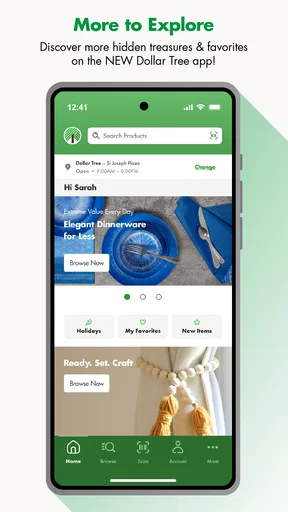
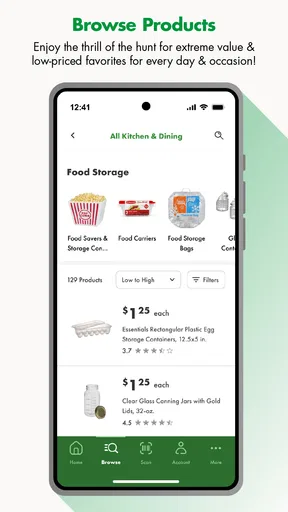
First things first, the app is super easy to navigate. When you open it up, you’re greeted with a clean, straightforward interface. It’s like walking into a neatly organized store, but without the physical effort. You can browse through different categories, just like you would in the store, and discover everything from household essentials to party supplies.
The search function is pretty solid. Need something specific? Just type it in, and boom, you get a list of options. This feature saves you from endless scrolling, especially if you’re in a rush. Plus, the ability to filter results by price or category? Chef’s kiss!
Search with a shopping goal in mind
I get the most from browsing when I start with a job to do rather than a vague plan to “see what’s there.” Searching for a type of item can bring me to a smaller set of possibilities, while categories help when I know the occasion but not the exact product. For example, if I am preparing for a small get-together, I can explore party supplies first instead of scanning every section of the store mentally.
A useful habit is to try a broad search, then refine it with a category or a more specific term if the first results feel too wide. That keeps browsing from turning into a long scroll. I would still treat the screen as a planning aid, not a guarantee that a particular item will be on a nearby shelf. Before making a special trip for one specific find, I’d keep a backup choice in mind.
Deals and Discounts Galore
Let’s talk savings. Who doesn’t love a good deal, right? The app frequently updates with the latest discounts and offers. It’s like having a personal shopper who’s obsessed with saving you money. You’ll find exclusive app-only deals, which is a nifty perk for being a tech-savvy shopper.
Worth Reading Before You Choose

EA SPORTS FC Mobile 26 Is a Bigger Football Game, but It Takes Time

Flipboard Shows What News Apps Must Do Beyond the Feed

Switching to Android Auto Means Rethinking Your Driving Routine

Google Calendar Makes a Crowded Week Easier to Manage

Ludo King Makes the Most of the Minutes Between Plans

Baby Panda World Brings Quick Play to Modern Phones, but Its Game Library Feels Busy
On top of that, you can use the app to access their loyalty program. It’s not just about saving a few bucks; it’s about feeling like a VIP every time you shop. The app notifies you about upcoming sales, so you’re always in the loop. No more missing out on those sweet discounts just because you forgot what day it was.
Build a list before leaving home
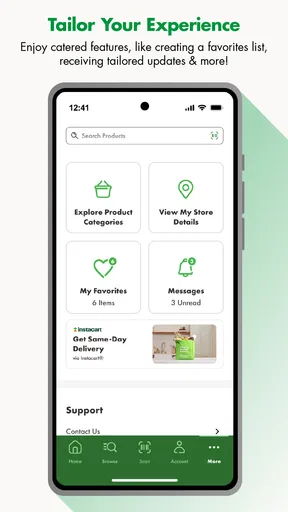
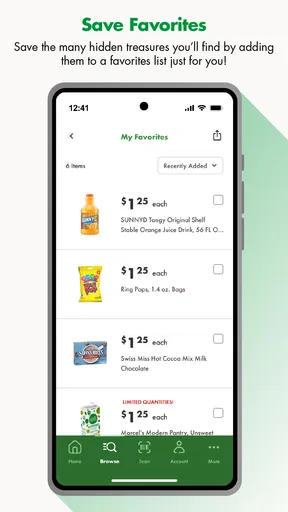
If you’re like me, you probably forget what you need halfway through your shopping trip. This app has got your back with its handy shopping list feature. You can create lists for different occasions, whether it’s a BBQ party or just your weekly groceries. It keeps you organized and ensures you don’t miss anything important.
Adding items is a breeze, and you can even check them off as you go. It’s like having a digital checklist that fits right in your pocket. This feature is especially useful when planning trips during the holiday season when your list seems to grow longer by the minute.
A realistic trip, from list to aisle
Imagine I’m getting ready for a casual gathering after work. At home, I can search for a few party supplies and household basics, then make a list so I don’t rely on memory once I’m in the store. If I’m going with someone else, a clear list also gives us a shared plan: one person can focus on the items still needed while the other checks what has already been picked up. The practical benefit is less backtracking and fewer impulse detours, not a promise that every item will be available.
For a larger occasion, I’d split the list by purpose in my own notes or make separate lists if that fits the app’s list workflow. That way, decorations and serving supplies don’t get mixed up with everyday essentials. I’d also check the list before setting out and keep it flexible; a bargain-store visit can be enjoyable precisely because there may be alternatives worth considering, but that discovery is easier when the must-haves are already clear.
Deals need a little perspective
Discounts can make browsing more rewarding, but I try not to let a deal become the reason to buy something I did not need. A useful approach is to start with the shopping list, then look at offers that match it. That turns a promotion into a possible saving rather than a nudge to add extras. It is also worth comparing what an item will actually do for me with the amount and quality I need, instead of treating a low price as automatically good value.
Notifications can help keep an eye on offers, but they are most useful when I want that reminder. If I am only making an occasional trip, I would rather check the app when planning to shop than let shopping alerts interrupt unrelated parts of the day. The app’s promotional side works best for someone who already visits the retailer or enjoys browsing; a person who wants a strictly minimal shopping tool may prefer to focus on search and lists.
In-Store Experience
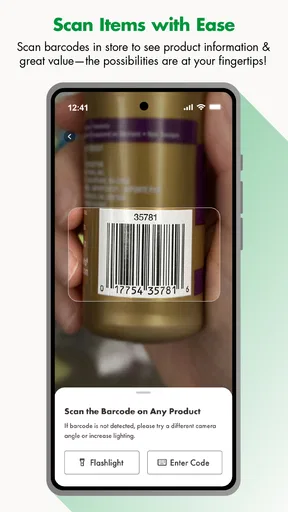
One of the coolest features is the barcode scanner. Picture this: you’re in the store, debating whether you should buy that cute vase. Just scan the barcode, and the app will give you all the details you need. From product information to reviews, it’s all right there. No more second-guessing your purchases or spending forever reading labels.
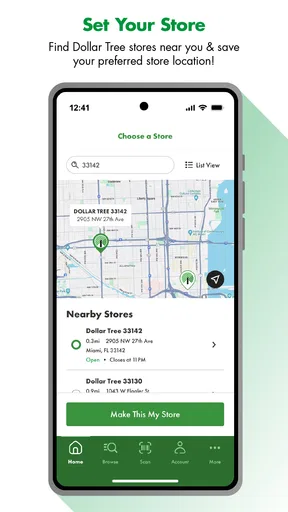
The app also helps you locate the nearest Dollar Tree store. Whether you’re at home or on the go, finding a store is just a few taps away. This is a lifesaver, especially when you’re in an unfamiliar area and need to stock up on essentials.
When the phone helps—and when it doesn’t
In-store, I see the scanner and store locator as tools for resolving a specific question, rather than features I need to use for every purchase. A scan can be handy when I want to check product details while holding an item, and the locator is useful when I’m in a new part of town. If I am already in a familiar store and know what I came for, opening the app for every decision could slow me down more than it helps.
I also would not use a product screen as a substitute for inspecting an item that depends on feel, dimensions, or finish. A vase, for instance, may look different in a photo than it does on a shelf, and checking it directly is the more sensible choice when appearance matters. The app’s strongest role is to help me find and evaluate possibilities; the physical store still has the advantage for a quick hands-on judgement.
Compared with other ways to shop
Compared with a general shopping marketplace, this app is more focused on Dollar Tree’s own assortment and store visits. That focus can be an advantage when I already know I want to browse this retailer: I can search its categories and plan around a nearby location instead of filtering through unrelated sellers. A broad marketplace is usually a better fit when I need to compare many brands, specifications, or delivery options across different retailers.
A paper list or a basic notes app may be enough for someone who only wants to remember a few groceries. The reason to use this app instead is having the store’s browsing experience alongside the list and in-store tools. On the other hand, shoppers who prefer to compare products across several stores may find a retailer-specific app limiting. I would use it for a Dollar Tree trip, and another shopping service when broad price or brand comparisons are the main task.
Who gets the most from it
I think the app makes most sense for regular Dollar Tree shoppers, people planning a party or seasonal project, and anyone who likes to browse before deciding what to buy. The shopping list is especially helpful if several small needs have to be handled in one visit. A parent putting together supplies for a school activity, for example, can use categories to explore options and a list to keep the errand organized.
It is less compelling for someone who rarely shops at Dollar Tree, needs a product from a particular brand, or expects a shopping app to compare the whole market. It may also be unnecessary if a short handwritten list already works well and the person does not want retailer-specific browsing or notifications. I would install it when I expect to make use of its store-focused tools, rather than simply because every retailer has an app.
What to expect before installing
The app is currently at version 1.5.1 and requires Android 7.0 or later. That makes it a straightforward option for people using a compatible Android device, while iPhone shoppers should check the relevant app store for their device’s requirements. Its store rating suggests a generally positive reception, but I would still judge it by whether its browsing and planning tools fit my own shopping habits.
One question people often have is whether it can replace a store visit. For me, it cannot: it helps me prepare and explore, while the store is where I can make a final hands-on choice. Another is whether it is useful for a quick errand. Yes, if I have a defined need and use search or a saved list to stay focused; if I am already standing in the aisle and know exactly what I want, the benefit is smaller.
Final Thoughts
So, is the Dollar Tree app worth your phone space? Absolutely! It brings the convenience of dollar store shopping to your fingertips, complete with exclusive deals and a personalized shopping experience. Whether you’re a frequent shopper or just someone who loves a good bargain, this app is a must-have for your digital toolbox.
Download it, explore, and who knows? You might just discover a new favorite item or snag a deal that makes your day. Happy shopping, everyone!
Pros
- Easy to navigate user interface.
- Wide range of affordable products.
- Exclusive app-only discounts.
- Convenient online shopping options.
- Fast loading times and performance.
Cons
- Limited in-app customer support.
- Occasional app crashes reported.
- No loyalty program available.
- Limited stock notifications.
- No dark mode option for app.
FAQs for Dollar Tree
What features does the Dollar Tree app offer?
The Dollar Tree app provides a variety of features to enhance your shopping experience. Users can browse weekly ads, access store locations, and create shopping lists. Additionally, the app offers exclusive mobile coupons and notifications about sales and promotions, helping you save even more on your purchases.
How user-friendly is the Dollar Tree app?
The Dollar Tree app is designed with a simple and intuitive interface, making it easy for users of all ages to navigate. The layout is straightforward, with clear categories and search functions to help you find what you need quickly. Users generally find it easy to create shopping lists and access deals.
Are there any costs associated with using the Dollar Tree app?
No, the Dollar Tree app is completely free to download and use. There are no hidden fees or in-app purchases. The app is designed to provide value by offering discounts and deals, ensuring that users can maximize their savings without any additional costs.
Is the Dollar Tree app available on both Android and iOS?
Yes, the Dollar Tree app is available for both Android and iOS devices. You can download it from the Google Play Store for Android devices or the Apple App Store for iOS devices. The app is regularly updated to ensure compatibility with the latest operating systems.
How can I ensure the security of my personal information on the Dollar Tree app?
Dollar Tree prioritizes user security by implementing industry-standard encryption and data protection measures. Users are encouraged to download the app from trusted sources like official app stores and keep their devices updated to ensure the highest level of security for their personal information.


